

We know there are a lot of changes to the layout of the scope 3 section on the Data Entry tab, but do not worry - all your data and the categories you are familiar with are still there! We have reorganized the scope 3 section of the Data Entry tab to align with the 15 GHG Protocol categories. Each scope 3 page (e.g., 1. Purchased goods and services) then has buttons for the data entry options for that scope 3 category. Some categories have multiple data entry options, and some just have a single option. As we continue to devleop out scope 3 functionality, we will add more data entry options in the future.
This table maps the 15 scope 3 categories with the data entry options for each.
*Some FERA emissions are calculated based on data entry in scope 1 and scope 2. The options currently built into SIMAP are FERA emissions associated with most scope 1 stationary sources and T&D losses associated with purchased electricity. In both of these cases, you will not enter any data specifically into the FERA category -- the emissions will calculate from your scope 1 and scope 2 activity data.
Diagram of operational bounds for greenhouse gas inventories
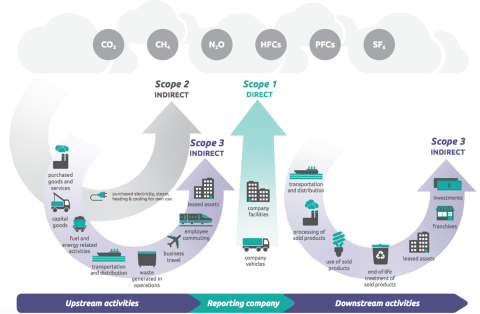
Source: GHG Protocol Corporate Value Chain (Scope 3) Accounting and Reporting Standard